
Introduction
In the dynamic landscape of modern business, effective collaboration and seamless communication are paramount. Enter the Surface Hub 2S, a cutting-edge solution designed to revolutionize teamwork and elevate productivity within organizations. With its innovative features and intuitive design, the Surface Hub 2S is poised to redefine how teams collaborate, share ideas, and make impactful decisions. In this comprehensive guide, we'll delve deep into the capabilities, benefits, and real-world applications of the Surface Hub 2S, exploring how this technology is reshaping the way we work together.
Surface Hub 2S: An Overview
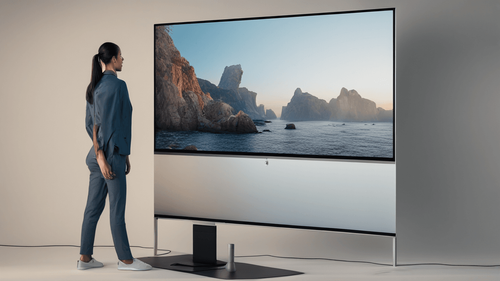
The Surface Hub 2S is a state-of-the-art interactive whiteboard and collaborative tool that seamlessly integrates hardware and software to enhance teamwork and communication. At its core, the Surface Hub 2S boasts a stunning 4K+ display that responds to touch, pen, and voice commands, creating a truly interactive workspace.
Key Features and Specifications
The Surface Hub 2S is packed with features that empower teams to work smarter and more creatively. Some of its notable specifications include:
- Screen Size and Resolution: A spacious 50.5-inch display with a crisp 4K+ resolution, ensuring clarity and vividness in presentations and content.
- Touch and Pen Interaction: The touchscreen capabilities combined with the Surface Pen allow for natural and precise interactions, making it easy to draw, annotate, and collaborate.
- Modular Design: The lightweight and portable design of the Surface Hub 2S enables flexible placement and seamless transitions between spaces.
- Microsoft Teams Integration: Deep integration with Microsoft Teams facilitates virtual meetings, video conferencing, and real-time collaboration, both in-person and remotely.
- Wireless Connectivity: Miracast support and wireless projection enable easy content sharing from personal devices to the Surface Hub 2S.
Enhancing Collaboration with Surface Hub 2S
The Surface Hub 2S goes beyond traditional presentation tools, ushering in a new era of collaborative work environments. Its intuitive interface and versatile features are designed to foster engagement and innovation among team members.
Interactive Brainstorming and Idea Generation
With the Surface Hub 2S, brainstorming sessions take on a new dimension. The large touchscreen canvas encourages participants to ideate freely, sketch concepts, and visualize ideas collectively. The interactive nature of the device nurtures creativity and transforms concepts into actionable plans.
Effortless Digital Whiteboarding
Surface Hub 2S eliminates the limitations of traditional whiteboards. Its digital whiteboarding capabilities allow teams to draw, erase, and manipulate content with ease. Whether in the same room or connected remotely, teams can collaborate on the same virtual canvas, facilitating real-time contributions.
Seamless Document Collaboration
Gone are the days of passing documents around the room. The Surface Hub 2S enables simultaneous document editing, making collaborative editing efficient and straightforward. Changes are reflected instantly, promoting a seamless workflow.
Engaging Virtual Meetings
In an increasingly interconnected world, virtual meetings play a pivotal role. Surface Hub 2S leverages its integrated Microsoft Teams support to bring virtual participants into the same room. Crystal-clear audio and video, coupled with interactive content sharing, make remote meetings engaging and effective.
Real-World Applications of Surface Hub 2S
The Surface Hub 2S transcends industries, finding utility in various sectors where collaboration, communication, and innovation are essential.
Education and Training
Educational institutions embrace the Surface Hub 2S to transform traditional classrooms into interactive learning environments. Teachers can annotate lessons, incorporate multimedia content, and encourage student participation, enhancing the learning experience.
Creative Design and Marketing
Design teams leverage the Surface Hub 2S to visualize concepts, iterate on designs, and showcase ideas to clients. The interactive touchscreen becomes a canvas for creative expression, streamlining the design process and accelerating decision-making.
Healthcare and Medical Collaboration
In the medical field, Surface Hub 2S facilitates multidisciplinary collaboration. Healthcare professionals can review medical images, discuss patient cases, and devise treatment plans in real-time, regardless of their physical locations.
Corporate Boardrooms and Strategy Meetings
Corporate settings benefit from the Surface Hub 2S's ability to facilitate strategic discussions. Board members and executives can access data, analyze reports, and make informed decisions collaboratively, bolstering efficiency and strategic planning.
FAQs
How does the Surface Hub 2S enhance remote collaboration?
The Surface Hub 2S seamlessly integrates with Microsoft Teams, offering virtual meeting capabilities with interactive content sharing, enabling effective collaboration among remote participants.
Can the Surface Hub 2S be customized to fit different room sizes?
Yes, the Surface Hub 2S's modular design allows it to be configured to suit various room sizes and layouts, ensuring optimal visibility and engagement for all participants.
What is the advantage of using digital whiteboarding over traditional whiteboards?
Digital whiteboarding on the Surface Hub 2S provides more flexibility and interactivity. It allows for easy content manipulation, remote collaboration, and the ability to save and revisit ideas.
Is the Surface Hub 2S compatible with devices other than Microsoft products?
While the Surface Hub 2S seamlessly integrates with Microsoft products like Teams, it also supports Miracast for wireless projection, enabling content sharing from a variety of devices.
Can the Surface Hub 2S be used in both landscape and portrait orientations?
Yes, the Surface Hub 2S can be oriented in both landscape and portrait modes, allowing for versatile content display and interaction.
Does the Surface Hub 2S require a dedicated IT team for maintenance?
No, the Surface Hub 2S is designed for easy setup and maintenance. Updates and management can be handled through Microsoft's cloud-based management tools.
Conclusion
The Surface Hub 2S marks a pivotal advancement in collaborative technology, offering an immersive and interactive workspace that transcends physical barriers. By fostering engagement, communication, and innovation, this remarkable tool empowers teams across industries to achieve more together. From creative brainstorms to critical business decisions, the Surface Hub 2S is a testament to the boundless possibilities that arise when cutting-edge technology meets human ingenuity.
So why wait? Embrace the future of collaboration with the Surface Hub 2S and unlock a world of possibilities for your team and organization.